AI Search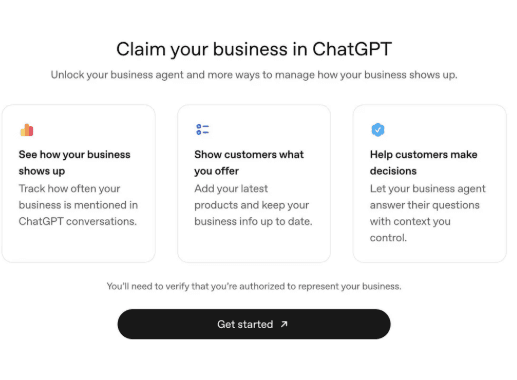
Claim Your Business in ChatGPT | Business Hub Guide
Claim your business in ChatGPT, use Business Hub, and keep ChatGPT search able to read your site. A practical guide for Irish and UK local firms this week.
16 min read
Claim your business in ChatGPT, use Business Hub, and keep ChatGPT search able to read your site. A practical guide for Irish and UK local firms this week.
ChatGPT now asks some owners to claim their business. If you do Local SEO in Ireland or the UK, that prompt is worth taking seriously. It is not a new Map Pack. It is not a replacement for Google Business Profile. It is a public company layer inside ChatGPT, with a back office OpenAI is calling Business Hub.
OpenAI rolled the tools out on 10 November 2026. Coverage the same day, including TechCrunch, compared it to Google: a listing you can claim, facts you can correct, and for some firms a labelled Business Agent. The claim screen is already appearing for operators we work with.
This guide is the practical version. What the screen promises. Who can claim. How to prepare for verification. What still is not documented. And why your website still decides whether ChatGPT can mention you after you tap Get started.
Searchers mix the names. They are different products.
ChatGPT Business is OpenAI's paid workspace for teams. People looking for ChatGPT Business free, ChatGPT Business subscription, or Chat GPT Business are usually after seats, admin controls and company files. That is not this article.
Businesses in ChatGPT is the beta for companies that show up in answers. You claim a profile, tidy the details, view aggregated insights, and if you are eligible you can launch a Business Agent.
If a client asks for the ChatGPT business profile login, they mean the second product. There is no long-standing URL in the style of business.google.com. The path we have seen starts inside ChatGPT, from the claim prompt, then Business Hub after you verify.
There is also no official ChatGPT business profile PDF or ChatGPT business profile template. Ignore downloads that promise a ranking boost. Keep one source of truth: the same name, phone, hours, services and website you already use on Google and on your contact page.
The desktop screen is titled Claim your business in ChatGPT. The line under it talks about unlocking a business agent and more ways to manage how the business shows up. Three cards sit above a black Get started button:
The only legal-sounding note is the footnote: you must verify that you are authorised to represent the business. The screen does not list the documents, email, domain check or Shopify connect until you start.
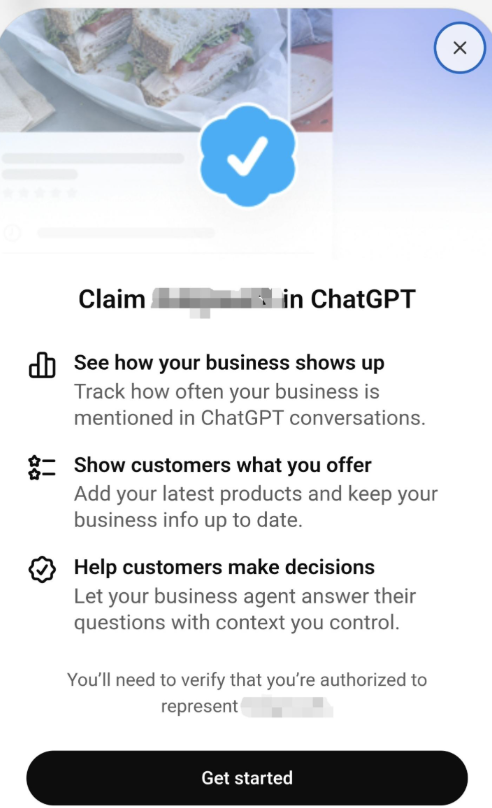
The mobile sheet is the same promise in a tighter layout: mention tracking, product updates, a labelled agent, then Get started.
Local SEO people on Reddit are asking the same three questions we get on calls: what did verification ask for, is there a cost, and does a claimed profile get recommended more often? Those are the right questions. The honest answers, based on OpenAI's own framing plus reporting from TechCrunch and Digiday, sit below.
Think of Business Hub as ChatGPT's back office for a claimed company, not as a ranking dashboard.
The beta, as described in the 10 November 2026 coverage, has three parts:
OpenAI has said ChatGPT now has on the order of 1.2 billion weekly users. That is why a claim flow exists. It is also why a blue check is not a traffic plan. User volume is not the same as mention volume for a plumber in Cork or a clinic in Galway.
OpenAI says eligible businesses in places where ChatGPT is available can claim a profile through Business Hub. Three routes have been named:
Business Agents are narrower. At launch they are aimed at eligible ecommerce and online service businesses in the United States. OpenAI has said it plans to add markets and categories. If you run a trades, medical or professional-services firm in Ireland or the UK, claim the profile if the prompt appears. Do not expect a US-only agent feature to land on your account on day one.
Claiming a profile and launching an agent are not the same eligibility test.
Verification details appear after Get started, so go in with your facts ready. Treat it like a Google Business Profile claim, not like a social signup.
Have these to hand:
If two directors share ChatGPT accounts, decide who will own the claim. Duplicate claims are harder to unwind than a slow start.
After you verify, the useful work is familiar:
OpenAI's example of a verified profile shows a blue check, products, business details and a link to the website. That last part is the one local firms should not skip. The profile is supposed to send people to you. If the website is thin, slow, or blocked to ChatGPT search, the profile has nowhere useful to point.
Keep the claimed profile as tidy as Google Business Profile. Same NAP. Same hours. Same service names. If ChatGPT says you close at 5 and Google says 6, you have created doubt in two systems instead of one.
There is no public, stable "ChatGPT claim my business" form that works like Google's postcard flow. From the screens we have, the path is:
If the prompt has not appeared yet, do not pay anyone to submit you to ChatGPT. Keep the entity clean and wait for eligibility to widen. Paying for a fake listing is how you create a duplicate you then cannot control.
After you claim, keep Google Business Profile tighter than ever. People who see you in ChatGPT still check Google before they call.
Business Hub insights, as described at launch, cover:
The numbers are aggregated. OpenAI says it does not hand businesses the underlying user chats or Business Agent transcripts. Insights only appear once there are enough conversations to pass a privacy threshold. A small local site may see almost nothing at first. That is not a bug. It is a small-sample rule.
Digiday reported a detail that changes how you read the mention count: a mention is counted when ChatGPT references the business's website. Naming the brand in passing does not count. For Local SEO that is both frustrating and useful. Frustrating, because a spoken "try Murphy's in town" may never show in the dashboard. Useful, because it tells you the lever is still crawlable, citable pages, not a claimed badge.
Business Hub shows you a number. It does not move the number.
No. That is the sentence to send a client who wants to claim ChatGPT for rankings.
Launch reporting is consistent. Claiming a profile is framed as a way to give ChatGPT accurate, current information. It is not described as a way to appear more often. TechCrunch's comparison with Google is about having a listing you can manage, not about inheriting Map Pack mechanics.
If you want more citations, you still do the work that makes a system willing to name you:
We already cover that stack in how an Irish business can appear in ChatGPT search and how a local business can appear in AI search. Business Hub sits on top of that work. It does not replace it.
When a business appears in an answer, a person can open its ChatGPT profile. If an agent exists, they can ask follow-ups: how two products differ, what is in stock, what a service includes.
A few rules from the launch material, in plain English:
Is a Business Agent an ad? Not by itself. It is a labelled chat that speaks for the business. Paying to sponsor it is the ad layer.
For a Dublin solicitor or a Galway plumber, an agent is unlikely to be the first win. Accurate hours, a clean website, and a Google profile that matches the ChatGPT profile will do more this quarter.
Mentions and discovery topics both depend on your website being cited. The profile stores the facts you type. The pages ChatGPT cites are still yours. ChatGPT search still has to reach them.
Check these five things before you obsess over the claim button.
OpenAI documents OAI-SearchBot as the crawler behind ChatGPT search. GPTBot is a different bot that collects training data. Each one has its own user-agent line. Blocking GPTBot does not, by itself, remove you from ChatGPT search. A clumsy catch-all disallow, or a rule written for "GPT" that also catches OAI-SearchBot, can.
If someone asks whether blocking GPTBot removes the business from ChatGPT, the accurate answer is: not from ChatGPT search, unless you also blocked the search crawler.
robots.txt is only read if the request reaches your origin. Some CDN bot fights drop AI crawlers before that file is ever served. That block will not show up as a Disallow line. Look in bot management, WAF events and IP lists.
Many AI crawlers do not wait for JavaScript to paint the page. If your service copy, NAP and FAQs only appear after a client-side render, the crawler can see an empty shell. Server-rendered or prerendered HTML is the safer default.
Broken or duplicate JSON-LD is a gift to wrong answers: old phone numbers, two legal names, a closed location that is still marked open. Homepage Organization or LocalBusiness markup with sameAs links helps. Keep prices, names and URLs identical on the site and in the ChatGPT profile.
One WordPress security plugin, one "block AI" toggle, one intern edit to robots.txt can lock ChatGPT search out overnight. A single check in January is not a policy.
For a live read of crawler access, schema and on-page signals, run our AI Visibility Checker. It will not count ChatGPT mentions. That is Business Hub's job. It will tell you whether AI crawlers are allowed to read the page you want cited.
If you want the broader AI SEO framing, see what AI SEO means for local businesses in Ireland.
If you run or market a service business in Ireland or the UK, do this in order. Do not start with an agent brainstorm.
Day 1. If the claim screen is in your ChatGPT, start verification. If it is not, skip to the website.
Day 1 to 2. Align NAP, hours and services across website, Google Business Profile and any ChatGPT profile you can edit.
Day 2. Check robots.txt for OAI-SearchBot and ChatGPT-User. Confirm GPTBot rules did not swallow the search bot.
Day 3. Make sure the homepage and top service pages send their text in HTML. Run the AI Visibility Checker and, if you want a wider pass, the Site Audit Checker.
Day 4. Tighten one page that answers a real question customers already ask: "Do you cover Wicklow?", "Are you available evenings?", "What does a first visit include?"
Day 5. Ask for a handful of genuine Google reviews. Assistants and humans still use reputation as a shortcut.
Day 6 to 7. Only if Hub is open: add products or services that match the site. Do not invent a catalogue for a trades business that does not sell SKUs.
That is the whole programme. No unofficial PDF. No promised ChatGPT ranking.
The claim screen is honest about one thing and quiet about three others.
Not fully documented yet:
Clear enough to act on:
We will update this article when verification receipts from Irish and UK operators are consistent. Until then, treat Reddit anecdotes as anecdotes. One person's Shopify connect is not a solicitor's path.
Use the in-product claim screen when ChatGPT shows it, then complete verification in Business Hub. Shopify merchants can connect the store. Enterprise and ads customers can go through their OpenAI contact. There is no reliable third-party submission form.
Start from ChatGPT itself after you have claimed. OpenAI has not published a stable, Google-style login URL for this beta. If a page asks you to pay for ChatGPT Business profile access, it is probably selling the wrong product or a course.
If you mean the team workspace, no. That is a paid ChatGPT Business subscription. If you mean claiming a company profile in ChatGPT, launch reporting says Business Hub and Agents are free for now, with paid sponsorship sitting on top.
Not from OpenAI. The closest template is your existing Google Business Profile plus your contact page. Copy those facts. Do not fill a random PDF you found in search results.
OpenAI says no. Businesses get aggregated insights, not transcripts of user chats or agent conversations.
Yes. The profile links out. Website clicks are a reported metric. Discovery topics come from conversations where the website is cited. A claimed profile with a blocked or empty site is a listing with no landing page.
No. For Irish and UK service businesses, Maps, organic results and Google Business Profile still produce most calls. ChatGPT is an extra discovery path. Keep doing Local SEO. Add the claim when you are invited. See AEO / AI SEO if you want that work in a retained plan.
Facts in this article are drawn from OpenAI's 10 November 2026 Business Hub announcement as reported the same day, TechCrunch's write-up of the business profiles launch, and Digiday's reporting on mentions, cost and the point that claiming does not boost appearances. Screenshots are from the live ChatGPT claim screens.
This is a beta. Buttons, eligibility and insight definitions will move. We will correct the guide when the product contradicts what is written here.
If you want a second pair of eyes on whether ChatGPT search can read your pages, and whether your Google and website facts would survive a claimed profile, book a free consultation or start with the AI Visibility Checker.
Schedule a consultation and discover how we can help you generate more leads and revenue.